
How Do You Optimize for Local SEO? A Complete Checklist
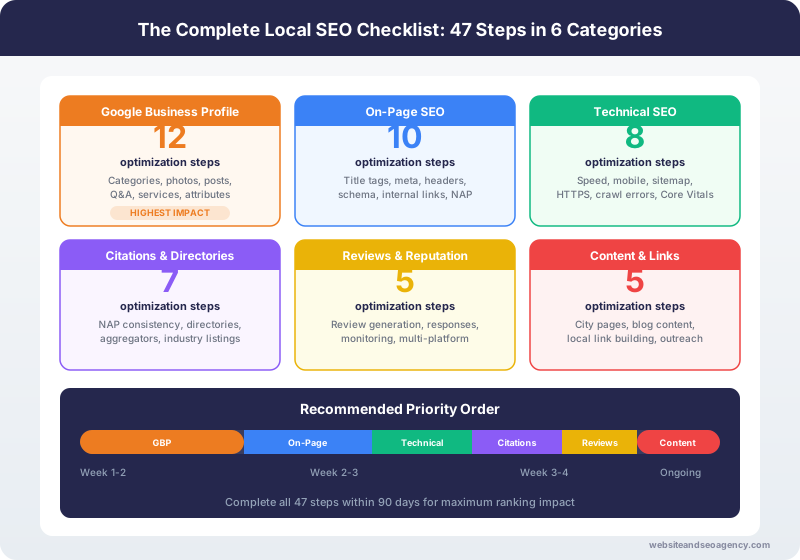
Optimizing for local SEO requires a systematic approach across five key areas: Google Business Profile, on-page website optimization, citation building, review management, and local link building. This 47-step checklist covers every action needed to build a strong local search presence, organized in the order you should complete them for maximum impact.
This is the exact checklist our team uses when onboarding new local SEO clients. We have refined it over years of helping local businesses improve their search visibility across the US and UK.
How to use this checklist: Work through each section in order. The Google Business Profile section delivers the fastest results, so start there. Check off items as you complete them, and revisit the entire checklist quarterly to ensure nothing has fallen behind.
Section 1: Google Business Profile Checklist (15 Items)
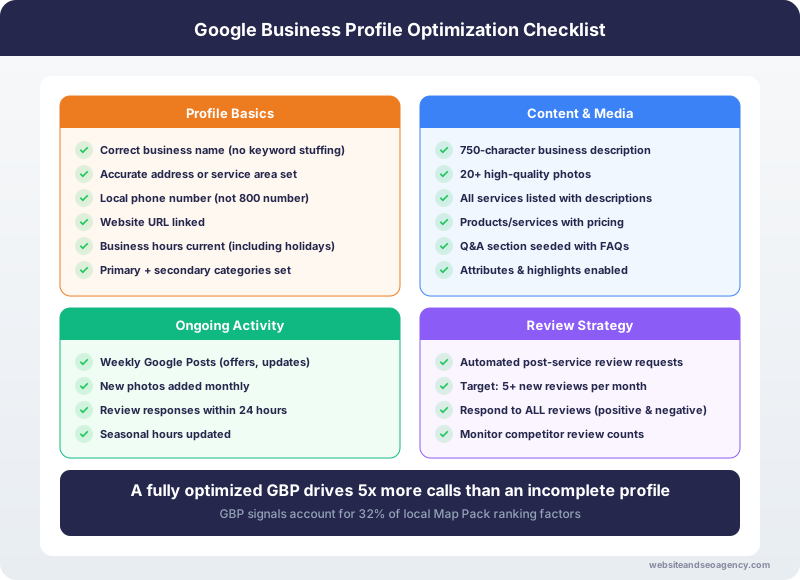
Your Google Business Profile is the foundation of local SEO. These 15 items directly impact your Map Pack visibility and should be your first priority.
1. Claim and Verify Your Google Business Profile
If you have not already claimed your GBP listing, do it now. Go to business.google.com and follow the verification process. Verification typically requires a postcard, phone call, or email confirmation. You cannot optimize what you do not control.
2. Choose the Correct Primary Category
Your primary category is the single most important GBP ranking factor. Choose the most specific category that describes your core business. "Plumber" is better than "Home Services." "Roofing Contractor" is better than "General Contractor." Research what category your top-ranking competitors use.
3. Add All Relevant Secondary Categories
Add every secondary category that applies to your business. A plumber might add "Water Heater Repair Service," "Drain Cleaning Service," and "Sewer Service." An HVAC company might add "Air Conditioning Repair Service," "Furnace Repair Service," and "Heat Pump Supplier." More categories mean more keyword associations.
4. Write a Keyword-Rich Business Description
Write a 750-word business description that naturally incorporates your primary keywords, services, and service areas. Front-load the most important information in the first 2-3 sentences because Google may truncate the display. Include your city name, primary services, and what makes you different.
5. Add Your Complete Service List
Add every service you offer using GBP's Services section. Include descriptions for each service with natural keyword usage. This helps Google understand exactly what searches your business should appear for.
6. Set Accurate Business Hours
Enter your regular business hours and update them for holidays and special occasions. If you offer 24/7 emergency service, consider setting "Open 24 hours" and noting regular office hours in your description. Incorrect hours frustrate customers and can lead to negative reviews.
7. Add Your Service Area
For service-area businesses (plumbers, roofers, HVAC, etc.), define your service area using the cities and regions you actually serve. You can list up to 20 service areas. Be honest about your actual coverage area.
8. Upload 20+ High-Quality Photos
Upload at least 20 photos including your storefront/office, team, vehicles, completed work (before and after), and equipment. Businesses with 100+ photos receive 520% more calls than those with none (Google data). Upload new photos weekly.
9. Create a Google Business Profile Post Weekly
Post at least once per week. Share completed projects, seasonal promotions, tips, and company news. Posts keep your profile active and can appear in search results. Each post is an opportunity to include keywords and a call-to-action.
10. Add Your Products or Services with Prices
If applicable, add products or services with pricing information. This gives potential customers the information they need to make a decision and increases engagement with your listing.
11. Complete the Q&A Section
Proactively add common questions and answers to your GBP Q&A section. This prevents customers (or competitors) from adding inaccurate information and gives you another place to include relevant keywords naturally.
12. Enable Messaging
Turn on the messaging feature so customers can contact you directly through your GBP listing. Respond to all messages within 24 hours. Quick response times are tracked by Google and may affect your visibility.
13. Add Your Appointment/Booking Link
If you use an online scheduling tool, add the booking link to your GBP. This gives customers a direct way to schedule service without calling, which increases conversions especially outside business hours.
14. Verify NAP Matches Your Website Exactly
Confirm that the business name, address, and phone number on your GBP matches your website exactly, character for character. This includes formatting (Street vs St.), suite numbers, and phone number format.
15. Monitor GBP Insights Monthly
Review your GBP Insights monthly to track search queries, views, actions (calls, direction requests, website clicks), and photo views. Use this data to identify which keywords drive the most engagement and where to focus optimization efforts.
Section 2: On-Page SEO Checklist (12 Items)
On-page SEO ensures your website supports your local rankings and converts visitors into leads.
16. Add NAP to Your Website Footer
Display your business name, address, and phone number in the footer of every page. Use the exact same format as your GBP listing. Mark this up with LocalBusiness schema for additional search engine context.
17. Implement LocalBusiness Schema Markup
Add structured data (JSON-LD format) to your homepage and location pages. Include your business name, address, phone, hours, geo-coordinates, service area, and business type. Test with Google's Rich Results Test tool.
18. Optimize Title Tags for Local Keywords
Every page's title tag should include relevant local keywords. Service pages should follow the pattern: "[Service] in [City] | [Business Name]." Example: "Emergency Plumber in Austin | Smith Plumbing."
19. Create Dedicated Service Pages
Build a separate page for each core service you offer. A plumber needs pages for drain cleaning, water heater repair, sewer line service, etc. Each page should target specific local keywords and include unique, helpful content (not just a paragraph and a contact form).
20. Build City-Specific Landing Pages
Create unique pages for each city or municipality you serve. Each page should contain genuinely unique content about that area, not just the city name swapped into a template. Include local landmarks, neighborhoods, and area-specific service information.
21. Optimize Meta Descriptions for Click-Through
Write compelling meta descriptions for every page that include your target keyword, city name, and a call-to-action. Meta descriptions do not directly affect rankings but significantly impact click-through rates from search results.
22. Ensure Mobile-Friendly Design
Test your website on Google's Mobile-Friendly Test tool. Over 60% of local searches happen on mobile devices. Your site must load quickly, be easy to navigate with a thumb, and have tap-to-call functionality.
23. Achieve Sub-3-Second Load Times
Test your site speed with Google PageSpeed Insights and aim for scores of 90+ on both mobile and desktop. Compress images, enable caching, minimize JavaScript, and use a CDN. Every second of load time costs you conversions: 53% of mobile users abandon sites that take over 3 seconds.
24. Add Click-to-Call on Every Page
Make your phone number clickable (use tel: links) and visible without scrolling on every page. For service businesses, phone calls are your primary conversion action. Do not bury your phone number in the footer only.
25. Embed a Google Map on Your Contact Page
Embed a Google Map showing your business location on your contact page (and optionally your homepage). This reinforces your location to both users and search engines.
26. Create an Optimized About Page
Your About page should include your business story, team information, service area, years in business, and any certifications or awards. Include photos of your actual team and facilities. This builds trust and provides additional local content.
27. Add Internal Links Between Related Pages
Link your service pages to relevant city pages, link blog posts to related services, and create a logical internal linking structure. Internal links help search engines understand your site structure and distribute page authority.
Section 3: Citation Checklist (10 Items)
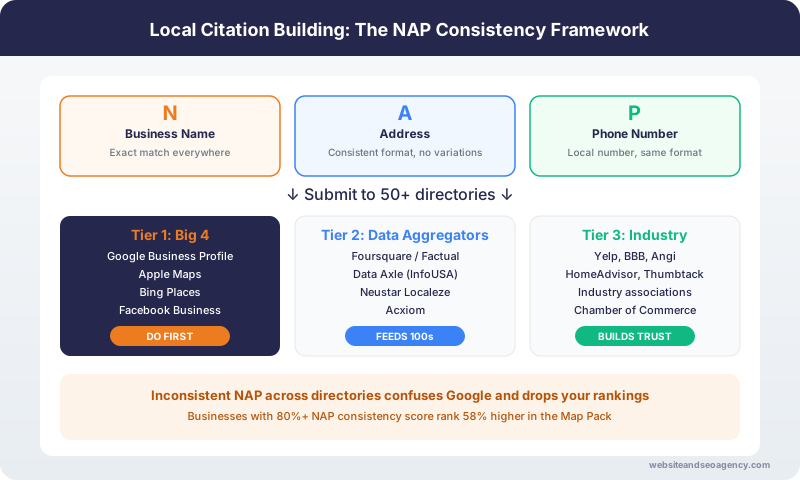
Citations build the NAP consistency that supports your local rankings.
28. Audit Existing Citations for Consistency
Use a tool like BrightLocal or Whitespark to scan for existing citations. Document every listing and flag any with incorrect or outdated information. Fix these before building new citations.
29. Submit to the Four Data Aggregators
Submit your business information to Data.com (Infogroup), Neustar Localeze, Acxiom, and Foursquare. These aggregators distribute your information to hundreds of smaller directories automatically.
30. Claim Yelp Business Page
Claim and fully optimize your Yelp listing. Add all business details, photos, and respond to reviews. Yelp is one of the highest-authority citation sources and often ranks on page one of Google for local searches.
31. Create Apple Business Connect Profile
Claim your business on Apple Business Connect (formerly Apple Maps Connect). With over 1 billion active Apple devices, Apple Maps drives significant local discovery, especially for businesses in areas with high iPhone usage.
32. Verify Bing Places Listing
Claim and verify your business on Bing Places. While Bing has lower search volume than Google, Bing Places data feeds into Cortana, Alexa, and many other services.
33. Complete Facebook Business Page
Ensure your Facebook Business Page has accurate NAP, business hours, complete service information, and regular posts. Facebook is both a citation source and a review platform.
34. Submit to Industry-Specific Directories
Identify and submit to the top 5-10 directories specific to your industry. Home service businesses should prioritize Angi, HomeAdvisor, Thumbtack, and Porch. Professional services should target industry-specific platforms.
35. Claim BBB Profile
Create or claim your Better Business Bureau profile. BBB listings frequently appear in Google search results and carry significant trust signals for consumers.
36. List on Local Chamber of Commerce
Join and list your business on your local Chamber of Commerce website. Chamber of Commerce links and citations carry strong local authority signals.
37. Set Up Ongoing Citation Monitoring
Use a citation monitoring tool to track your listings quarterly. Directories sometimes overwrite your information with data from aggregators, so regular monitoring catches issues before they affect rankings.
Section 4: Review Checklist (5 Items)
Reviews are a top-3 local ranking factor and the primary trust signal for converting searchers into customers.
38. Implement an Automated Review Request System
Set up automated review requests via text or email triggered after every completed job. Include a direct link to your Google review page. The best time to request a review is within 2 hours of service completion.
39. Respond to Every Review Within 24 Hours
Respond to every Google review, positive and negative, within 24 hours. Professional, thoughtful responses show potential customers you care about service quality. For negative reviews, respond empathetically and offer to resolve the issue offline.
40. Build Reviews on Secondary Platforms
While Google reviews are the priority, also build reviews on Yelp, Facebook, and industry-specific platforms. A diverse review portfolio across multiple platforms strengthens your overall online reputation.
41. Feature Reviews on Your Website
Display your best Google reviews on your website using a review widget or manual testimonial section. Include the reviewer's name, star rating, and review text. This builds trust for website visitors who have not yet checked Google.
42. Monitor Review Sentiment Monthly
Track your review sentiment (average rating, common themes, complaint patterns) monthly. Use negative review themes to identify and fix operational issues. Use positive themes in your marketing messaging.
Section 5: Local Link Building Checklist (5 Items)
Local backlinks from authoritative websites in your community strengthen your domain authority and local relevance signals.
43. Earn Links from Local News and Media
Pitch local news stories, offer expert commentary on relevant topics, or sponsor community events that get media coverage. A link from your local newspaper or news station carries strong local authority.
44. Build Relationships with Local Bloggers
Connect with local bloggers, community websites, and neighborhood platforms. Offer to contribute guest content, provide expert quotes, or sponsor content that earns natural backlinks.
45. Join Local Business Associations
Join industry associations, trade groups, and business networking organizations that list members on their websites. These memberships provide both citation value and backlink value.
46. Sponsor Local Events, Teams, or Charities
Sponsor local events, youth sports teams, charity runs, and community organizations. Most sponsorships include a link from the organization's website, which provides local link authority.
47. Create Locally-Focused Content That Earns Links
Create content about local topics: neighborhood guides, local event coverage, community spotlights, or local industry analysis. Content with genuine local relevance earns natural links and social shares from community members.
How to Prioritize This Checklist
If you cannot complete everything at once, prioritize in this order:
Week 1-2: Quick wins with immediate impact
Week 3-4: Build the foundation
Month 2: Expand and strengthen
Month 3+: Authority building
Measuring Your Progress
Track these metrics monthly to measure the impact of your local SEO work:
Need Professional Help With Your Local SEO?
This checklist works whether you implement it yourself or hire a professional. If you want expert implementation, our local SEO services follow this exact process, plus advanced strategies for competitive markets.
Get a Free Local SEO Audit and we will evaluate your current performance against this checklist, identify your biggest opportunities, and show you exactly what to prioritize.
Want Professional Help?
Learn more about our Local SEO services and how we can help your business dominate local search results.
Explore Local SEO ServicesFrequently Asked Questions
How long does it take to complete a local SEO checklist?
What is the most important item on a local SEO checklist?
Do I need to hire an SEO agency to complete this checklist?
How often should I audit my local SEO?
What local SEO tools do I need?
About the Author
Web Wise Team
The Web Wise Team uses this exact checklist to audit and optimize local businesses across the US and UK. These are the same steps we follow in our professional local SEO campaigns.