
Why Google Reviews Matter for Your Business
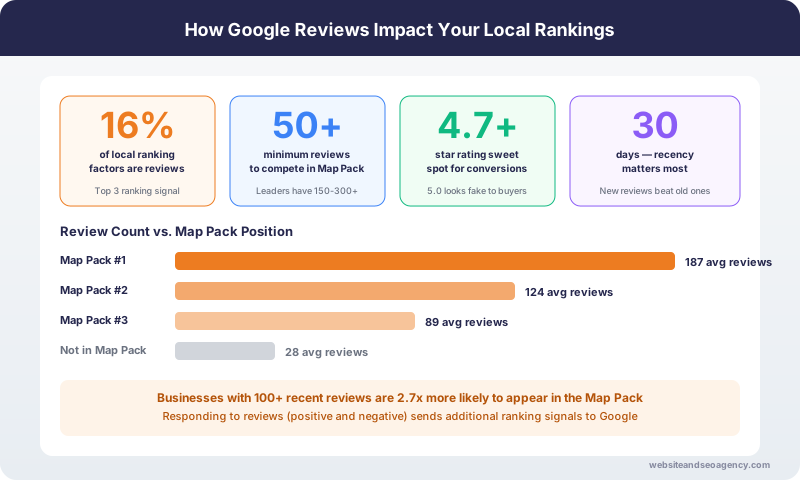
Google reviews directly impact your visibility in local search results and your ability to convert searchers into customers. Businesses with more reviews and higher ratings consistently outperform competitors in the Google Map Pack,reviews are one of the top Google Maps ranking factors.
Beyond rankings, reviews build trust. 93% of consumers read online reviews before making a purchase decision. Combined with strong SEO services, a strong review profile is often the deciding factor between you and a competitor.
The businesses dominating local search treat review generation as a systematic process, not a random occurrence. This guide shows you how to build that system.
Need help implementing a complete review strategy? Our local SEO services include done-for-you review optimizations.
How Reviews Impact Your Google Rankings
Reviews affect your local search visibility in several ways:
Quantity Signals
More reviews indicate a more established, popular business. Google uses review count as a trust signal when deciding who to show in search results.
Quality Signals
Higher average ratings suggest better customer experiences. While Google does not require perfect 5-star ratings, businesses with significantly lower ratings than competitors face disadvantages.
Recency Signals
Recent reviews carry more weight than old ones. A business with 10 reviews in the last month often outranks one with 100 reviews from two years ago.
Keyword Relevance
When customers mention specific services in their reviews, Google associates your business with those terms. "Great emergency plumber" in a review helps you rank for emergency plumber searches.
Engagement Signals
Responding to reviews shows Google (and customers) that you actively engage with feedback. Response rate is a factor in local rankings.
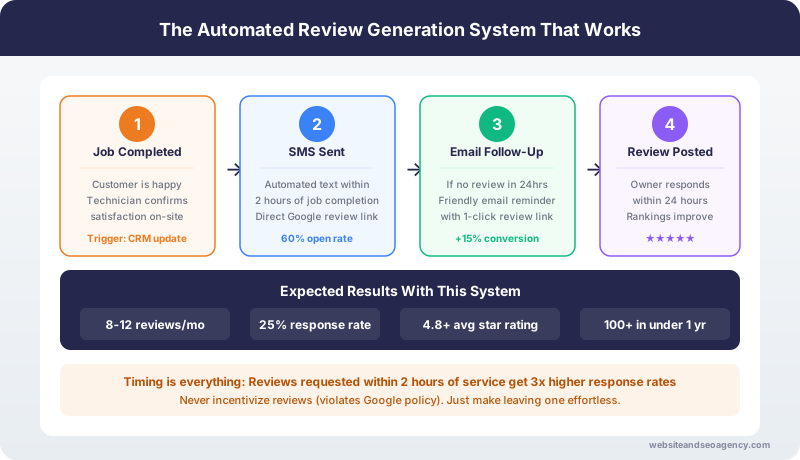
Building a Review System That Works
Step 1: Identify Your Best Moment
The best time to ask for a review is at the peak of customer satisfaction. This varies by business:
Service businesses: Right after completing the job, while the customer is still impressed
Retail: After the customer has had time to use the product (follow-up email)
Restaurants: Before the customer leaves, when they are complimenting the meal
Professional services: After achieving a positive outcome
Identify your peak moment and build your ask around it.
Step 2: Create a Frictionless Process
Every obstacle reduces completion rates. Make leaving a review as easy as possible:
Get your direct review link:
This link opens directly to your review form, skipping multiple steps.
Delivery methods:
Step 3: Ask In Person
For service businesses, a genuine in-person ask is most effective:
Script example:
"We really appreciate your business. If you were happy with our work today, would you mind leaving us a Google review? It helps other homeowners find us. I can text you a direct link right now."
Key elements:
Step 4: Follow Up Once
Many customers intend to leave reviews but forget. One follow-up is appropriate:
Follow-up text (24-48 hours later):
"Hi [Name], thanks again for choosing [Business]. If you have a moment, we would really appreciate a Google review: [LINK]. No worries if not - we hope to serve you again!"
Key elements:
Do not send multiple follow-ups. One reminder is helpful; more becomes annoying.
Step 5: Respond to Every Review
Responding to reviews serves multiple purposes:
For positive reviews:
Response template (positive):
"Thank you so much for the kind words, [Name]! We're glad the [specific service] worked out well. We appreciate you taking the time to share your experience. Looking forward to helping you again!"
For negative reviews:
Response template (negative):
"[Name], we're sorry to hear your experience didn't meet expectations. This isn't the standard we strive for. Please contact us directly at [phone/email] so we can make this right. We appreciate your feedback and the opportunity to improve."
Never argue in review responses. Take it offline.
Review Request Templates
Text Message Template
"Hi [Name], thank you for choosing [Business]! If you have a moment, a Google review would mean a lot to us: [LINK]. Thanks again!"
Email Subject Lines
Email Body Template
"Hi [Name],
Thank you for choosing [Business Name] for your [service type].
We hope everything exceeded your expectations. If you have a moment, we would be grateful for a Google review. It helps other [customers/homeowners] find us and lets us know we are on the right track.
[BUTTON: Leave a Review]
Thanks again for your business!
[Your Name]
[Business Name]"
In-Person Script (Service Business)
"Before I head out, I wanted to ask a quick favor. Would you mind leaving us a Google review? It really helps when homeowners are searching for a reliable [service]. I can text you a direct link right now if that would be helpful."
What NOT to Do
Do Not Offer Incentives
"Leave us a review and get 10% off" violates Google guidelines and can result in review removal or profile suspension.
Do Not Review Gate
Only asking customers who had positive experiences (filtering out unhappy customers) violates guidelines. Ask everyone.
Do Not Buy Fake Reviews
Purchased reviews are obvious to Google and potential customers. They risk profile suspension and destroy trust.
Do Not Use Review Kiosks
Having customers leave reviews on your device at your location can trigger spam filters.
Do Not Ask Too Often
Asking the same customer multiple times damages the relationship. One ask plus one follow-up maximum.
Handling Negative Reviews
Negative reviews happen to every business. How you handle them matters more than the review itself.
Respond Quickly
24-48 hours maximum. A fast response shows you care.
Acknowledge the Problem
Even if you disagree, acknowledge their frustration. "We're sorry you had this experience."
Take It Offline
Offer a phone number or email to resolve it directly. Public back-and-forth looks bad.
Make It Right If Possible
Offering to fix the problem shows character. Many customers update reviews after good resolution.
Learn From Patterns
If multiple reviews mention the same issue, address the underlying problem.
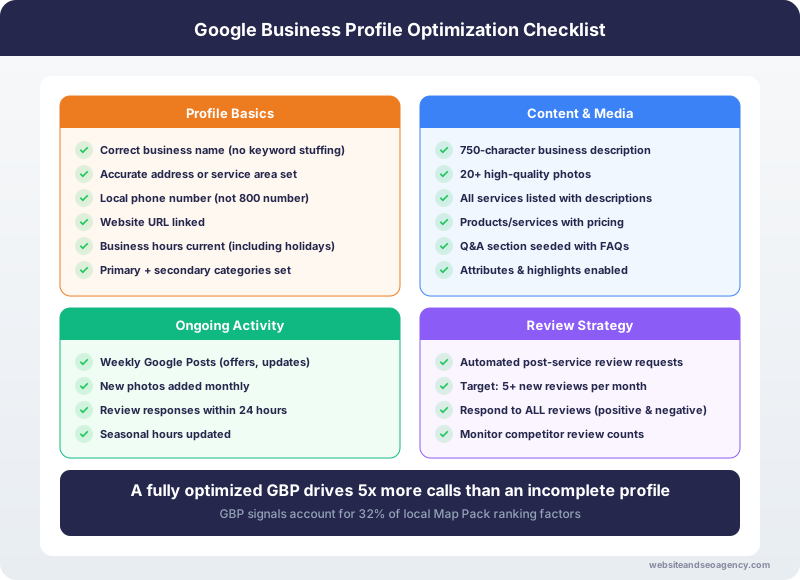
Review Velocity: Consistency Over Volume
Getting 50 reviews in one month then nothing for a year raises red flags. Google prefers consistent, natural-looking review patterns.
Better approach:
Our local SEO services include review optimizations that maintain healthy, consistent review velocity.
Measuring Your Review Performance
Track these metrics monthly:
Review count: Total reviews on your profile
Average rating: Your star rating (aim for 4.5+)
Review velocity: Reviews per month
Response rate: What percentage you respond to
Conversion impact: Leads/calls relative to review activity
Ready to Build Your Review Engine?
A systematic approach to reviews transforms local business visibility. Consistently asking for reviews and responding professionally builds the trust signals that drive rankings and conversions.
Get a Free Local SEO Audit and we will analyze your current review profile, compare you to competitors, and show you exactly how to build a review optimization that works.
Want Professional Help?
Learn more about our Local SEO Services services and how we can help your business dominate local search results.
Explore Local SEO Services ServicesFrequently Asked Questions
Is it legal to ask customers for Google reviews?
How do I get a direct link to my Google review page?
Should I respond to negative reviews?
How many Google reviews do I need?
Do Google reviews help SEO?
About the Author
Web Wise Team
The Web Wise Team helps local businesses improve their online visibility through comprehensive local SEO strategies.